

Improved management of user requests, better synchronization, information about domain health and much more!
Detailed Overview Of User Requests
This option gives you powerful, yet simple tools to further include users in the process of collecting data used in their signatures.
The improved procedure of approving user requests gives you a clean overview of current data and the requested changes so you can make better, more informed decisions.
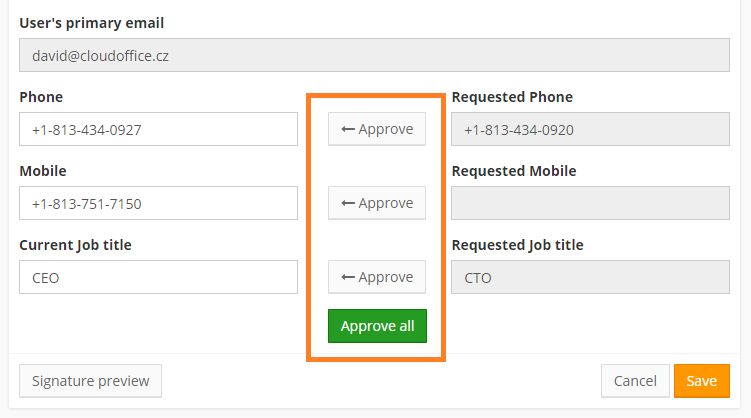
If you don’t want to “micromanage” the signatures, you can always set up automated approval in Settings. More details about the procedure and how to utilize it properly is available on our Help site.
More Synchronization Options
Another way of uploading data into SignatureSatori is synchronization with the G Suite directory. While we generally recommend to keep the databases mirrored, there are many situations when it will be necessary to have different or additional information in one of them.
This is the reason why we decided to introduce more “granularity” to the synchronization options. You can decide if you want to overwrite the data in SignatureSatori or if you want to synchronize only fields that have been empty so far.

You can learn more about these options if you go to our Help site.
Domain Health Check
The anti-spam and anti-phishing policies of Gmail are continually updated. The changes can sometimes unexpectedly cause your emails to end in spam on an unprecedented scale. That is why we decided to introduce the Domain Health Check.
Put very simply, the spam score of your emails depends on the content of the specific email and on the reputation of your domain. Domain Health Check informs you about three authentication methods that greatly improve the reputation and we sincerely recommend implementing them.

Even if you don’t experience any issues now, doing so will help you prevent future incidents. As always, more information can be found on our Help site.
Mass Profile Picture Update
Profile pictures of your users can greatly enhance your signatures – but it can be a hassle to manage them. With this feature, you will be able to keep the images in SignatureSatori up to date with your data in G Suite – either entered there by admin or changed by users in their Google Profile. Complete information available on our Help site.